
Selenium / Automation Testing course in Australia
Enroll in India's premier Selenium testing course, which is built on an industry-relevant curriculum, and learn from highly qualified instructors who have had extensive experience in the field. You will also receive guaranteed job interviews with our 2000+ hiring partners until you secure the first job offer .
 Job Interview Guarantee (JIG) Program*





You May Have Heard About Offers, But Have You Heard Of ExcelR's JUMBO PASS? Well, Here's Your Chance To Avail The JUMBO PASS!! Watch The video

Program Highlights

20+ Real-Time Case Studies
Percieve how Selenium is applied in real-life contexts with labs integrated to every module.

2+ Capstone Projects
Live projects provide a cumulative experience and molds you into a Selenium expert.

Guaranteed Job Interviews
Participants in the placement pool will get guaranteed job interviews with our 2000+ hiring partners until they receive the first job offer.

5 Value-Added Course
Other imperative skills a Selenium tester must have are covered as free add-ons.
Skills Covered

Java

Automation Testing

API Testing
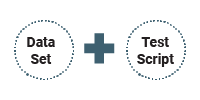
Data Driven Framework

Agile Methodology

Design Techniques

Page Object Model & Page Factory
Tools Covered

Eclipse IDE

IntelliJ

TestNG

Maven

GIT

Python

POSTMAN

DevOps Basics

JIRA

MySQL
Projects
Project 1: Automate the OrangeHRM application Using Data Driven Framework.
- Implement the POM framework
- Implement multiple browser execution.
- Write test Scripts in Test class and seperate the Page classes.
- Use the TestNG annotations as per need.
- Implement Assertions and Loggers as per need.
Project 2:Automate the Amazon.com application Using hybrid Framework.
- Implement the BDD framework using Gherkin Keywords.
- Implement parallel execution to save execution time. Implement algorithms to save time and space.
- Write 10+ Test Scripts, Test class automate end to end scenarios, Implement Fluent design pattern with or without POM.
- Implement reporting such as Allure/ Extent Report.
Career Progression

Learning Path
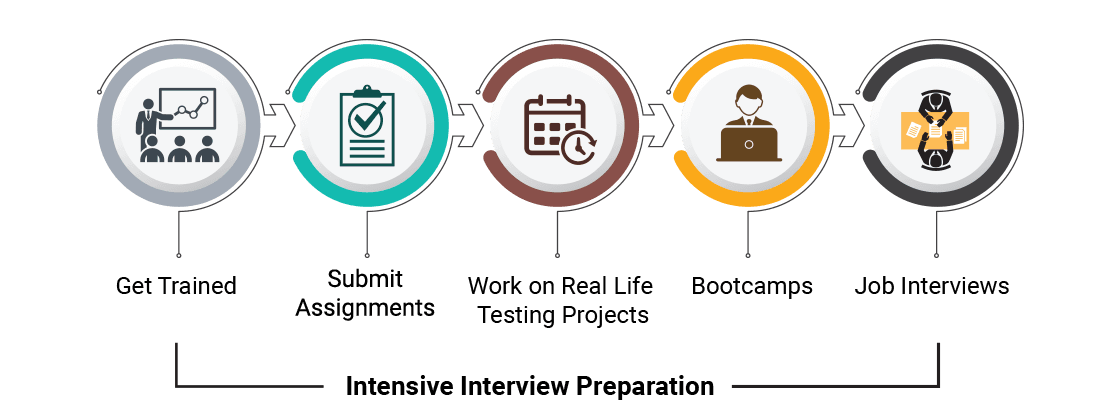
Why ExcelR

Industry-Based Course Curriculum

Value Added Courses Java, DevOps, Python, Jenkins & Agile

Work Hands-on with 2+ Live Projects

Guaranteed Job Interview Calls With Our 2000+ Hiring Partners

Support Through WhatsApp, Calls & Emails

Lifetime E-Learning Access
Course Curriculum
Selenium
Software Testing
- What is Software Testing? Definition, Basics & Types
- Sanity Testing Vs Smoke Testing: Introduction & Differences
- What is Test Scenario? Template with Examples
- Defect Management Process in Software Testing (Bug Report Template)
- Agile Methodology & Model: Guide for Software Development & Testing
Fundamentals of Java
- Introduction to JAVA & installation of JAVA & Eclipse
- Basic Java, Java Operators, Java data types, If Else statements, Loop statements, Constructors
- Java Collections
- Arrays, 2D Arrays, Array List, list
- Collection framework
- Java Strings
- Introduction of Strings in Java, All the String validation methods
- Java Variables & Methods
- Variables in Java, Methods in Java
- Java Access Specifiers
- Acess Specifires in Java, Constructors in Java
- Java OOPS Concepts
- Class, Object & Packages
- Inheritance Polymorphism
- Abstraction, Encapulation
- Exception Handling
- Try Catch finally block, Interfaces, File Handling
Understanding of HTML
- Locators in Selenium (id, name, class name)
- Dynamic Xpath and css selector creation
- Following sibling,
- Preceding sibling,
- Ancestor
- Parent
Selenium Module 1
- What is Automation Testing?
- What is Selenium?
- What is WebDriver?
- Features
- Architecture of Selenium
- Download Selenium Jars
- Invoking for Web browser (Chrome, Firefox, Edge)
- Navigation Commands
- WebDriver Commands
- FindElements Command
- Waits in Selenium
- Identifying and Interacting with HTML Elements using WebDriver
Selenium Module 2
- Check Box & Radio buttons
- Drop Down
- Multiple Selects
- WebTable Handling
- Alerts
- Handling iFrames
- Window Handles
- Action class: Mouse Events, Click, doubleClick, contectClick, dragAndDrop, clickAndHold,release, Tool tip verification, Keyboard Events
- Java Script Executor
- How to handle hidden elements
- How to handle broken links
- How to upload & Download file, Taking Screenshot
- Excel Handling using Apache POI, Reading & Writing from excel sheet
- Introduction to Maven Repository & Commands, POM.XML
Selenium Module 3
- Check Box & Radio buttons
- Drop Down
- Multiple Selects
- WebTable Handling
- Alerts
- Handling iFrames
- Window Handles
- Action class: Mouse Events, Click, doubleClick, contectClick, dragAndDrop, clickAndHold,release, Tool tip verification, Keyboard Events
- Java Script Executor
- How to handle hidden elements
- How to handle broken links
- How to upload & Download file, Taking Screenshot
- Excel Handling using Apache POI, Reading & Writing from excel sheet
- Introduction to Maven Repository & Commands, POM.XML
- TestNG Basics, Create TestNG.XML file / Test / TestSuite
- Run from TestNG and Tags in TestNG.XML file
TestNG Annotations - Hands on to explain how its used in the projects
1. dependsonmethods/group
2. Priority
3. Groups
4. data provider.
5. TestNG Listerners, Log 4j
Selenium Module 4
- Types of Frameworks:
- Data Driven,
- Page Object Model,
- Keywork Driven,
- Hybrid,
- BDD Cucumber (Overview of all frameworks)
- Cucumber framework creation with POM
- Cucumber framework creation with POM & Executing Automation scripts using BDD Framework
Introduction to API Testing (via Postman tool)
- API Testing (Manual Postman)
- Why API
- Types of API (Rest & SOPUI)
- API Collection
- Basic of API Testing (Get, Post, Put and delete)
a. Understanding of Path,Query,Parameters and Headers
b. Authentication
c. Add Place API and Execution through postman
d. Response Code of API
e.Validation and assertion on response - Requirments of API
- Understanding the API Contract
Value Added Courses
Core Python
- Introduction
- Python Introduction - Programing Cycle of Python
- Python IDE and Jupyter notebook
- Variables
- Variables , Data type.
- Code Practice Platform
- Github, Hacker rank, Code Wars and Sanfoundry accounts creation
- Number , string ,List , Tuple , Dictionary
- Operators
- Operator -Arthmatic ,comparison , Assignment ,Logical , Bitwise opeartor
- Decision making - Loops
- Loops
- While loop, for loop and nested loop
- Number type conversion - int(), long(). Float ()
- Mathametical functions , Random function , Trigonometric function
- Strings
- Strings- Escape char, String special Operator , String formatting Operator
- Build in string methods - center(), count()decode(), encode()
- List
- Python List - Accessing values in list, Delete list elements , Indexing slicing & Matrices
- Built in Function - cmp(), len(), min(), max(), list comprehension
- Tuples
- Tuples - Accessing values in Tuples, Delete Tuples elements , Indexing slicing & Matrices
- Built in tuples functions - cmp(), len ()
- Dictionary
- Dictionary - Accessing values from dictionary, Deleting and updating elements in Dict.
- Properties of Dict. , Built in Dict functions & Methods, Dict comprehension
- Date & time -Time Tuple , calendar module and time module
- Function
- Function - Define function , Calling function
- pass by refernece as value , Function arguments , Anonymous functions , return statements
- Scope of variables - local & global , Decorators and recursion
- Map reduce and filter
- Modules
- Import statemnts , Locating modules - current directory , Pythonpath
- Dir() function , global and location functions and reload () functions , Sys module and subprocess module
- Packages in Python
- Files
- Files in Python- Reading keyboard input , input function
- Opening and closing files . Syntax and list of modes
- Files object attribute- open , close . Reading and writing files , file Position.
- Renaming and deleting files
- Pickle and Json
- Directories
- mkdir methid, chdir () method , getcwd method , rm dir
- Exception Handling
- Exception handling - List of exceptions - Try and exception
- Try- finally clause and user defined exceptions
- OOP
- OOP concepts , class , objects , Inheritance
- Overriding methods like _init_, Overloading operators , Data hiding
- Regular Expressions
- match function , search function , matching vs searching
- Regular exp modifiers and patterns
- SQLite and My SQL
- Data base connectivity
- Methods- MySQL , oracle , how to install MYSQL , DB connection
- create , insert , update and delete operation , Handling erros
- Introduction to Django framwork , overview , environment
- Framework
- Apps life cycle , creating views
- Application, Rest API
DevOps
- Introduction to Devops
- What is Devops
- Devops Lifecycle, Continuous Development, Introduction to GIT
- GIT
- Branching / Merging in GIT, Ansible TutorialKubernetes Tutorial
- CICD Pipeline
- Introduction to Jenkins, Install and configure Jenkins, CICD Pipeline Introduction
MySQL
- Introduction to Database
- What is Database? Database testing?
- Types of Database
- What is MYSQL?
- DDL - Data Definition Language
- DML - Data Manipulation Language
- DCL - Data Control Language
- DQL - Data Query Language
- Overview of Database
- MYSQL Commands
- What is RDBMS?
- What is table?
- What is field?
- What is column?
- What is NULL value?
- MYSQL Constraints
- MYSQL Constraints
- NOT NULL Constraint: Ensures that a column cannot have NULL value.
- DEFAULT Constraint: Provides a default value for a column when none is specified.
- UNIQUE Constraint: Ensures that all values in a column are different.
- PRIMARY Key: Uniquely identified each rows/records in a database table.
- FOREIGN Key: Uniquely identified a rows/records in any another database table.
- CHECK Constraint: The CHECK constraint ensures that all values in a column satisfy certain conditions.
- INDEX: Use to create and retrieve
- Aggregation Functions: (Mean, Max, Count) Group by, Sorting order
- SQL Statements and Joins
- MYSQL Syntax
- MYSQL SELECT Statement
- SQL Joins
- Understanding of Data Contract & Mapping Specifications
- Understanding of Data COntract
- Understanding of Mapping Specifications
- Creating Test cases from Requirement
Contact Our Team of Experts
Why ExcelR?
FAQs
What Is JUMBO PASS?
- The all new and exclusive JUMBO PASS is the latest initiative taken by ExcelR to offer you access to attend unlimited batches over the duration of 365 days. You will be able to attend unlimited number of classes for the course of your choice.
Why should I choose ExcelR & not other training institute?
- Our trainers have 15+ years of experience in the field of their expertise from prestigious colleges such as IIT, ISB, IIM, etc. Also the training content which ExcelR provides is incomparable with any other training institute. We provide Selenium training which makes your profile complete.
What Is Instructor-Led Online Training?
- Instructor-led online training is an interactive mode of training where participants and trainer will log in at the same time and live sessions will be done virtually. These sessions will provide scope for active interaction between you and the trainer.
How Many Batches Can I Attend, If Enrolled For Training?
- ExcelR offers a blended model of learning. In this model, you can attend classroom, instructor-led live online and e-learning (recorded sessions) with a single enrolment. A combination of these 3 will produce a synergistic impact on the learning. You can attend multiple Instructor-led live online sessions for one year from different trainers at no additional cost with the all new and exclusive JUMBO PASS.
Is This A Live Training Or Recorded Sessions?
- It is a live instructor-led interactive session which is done at a specific time where participants and trainer will log in at the same time. The same session will be also recorded and access will be provided to revise, recap or watch any missed session.
What If I Miss A Live Session?
- Not a problem even if you miss a live Selenium session for some reason. Every session will be recorded and access will be given to all the videos on ExcelR’s state-of-the-art Learning Management System (LMS). You can watch the recorded Selenium sessions at your own pace and convenience.
Will I Get A Selenium Course Completion Certification From ExcelR?
- Yes, after successfully completing the course you will be awarded a course completion certificate from ExcelR.
Whom Should I Contact If I Want More Information About The Training?
- You can reach out to us by visiting our website and interact with our live chat support team. Our customer service representatives will assist you with all your queries. You can also send us an email at enquiry@excelr.com with your query. Our Subject Matter Experts / Sales Team will clarify your queries or call us on 1800-212-2121 (Toll-Free number – India), +1(281) 971-3065 (USA), 800 800 9706 (India), 203-514-6638 (United Kingdom), 128-520-3240 (Australia).
What Are The Different Modes Of Payment Available?
- The different payment methods accepted by us are
- Cash
- Net Banking
- Cheque
- Debit Card
- Credit Card
- PayPal
- Visa
- Mastercard
- American Express
- Discover
Global Presence
ExcelR is a training and consulting firm with its global headquarters in Houston, Texas, USA. Alongside to catering to the tailored needs of students, professionals, corporates and educational institutions across multiple locations, ExcelR opened its offices in multiple strategic locations such as Australia, Malaysia for the ASEAN market, Canada, UK, Romania taking into account the Eastern Europe and South Africa. In addition to these offices, ExcelR believes in building and nurturing future entrepreneurs through its Franchise verticals and hence has awarded in excess of 30 franchises across the globe. This ensures that our quality education and related services reach out to all corners of the world. Furthermore, this resonates with our global strategy of catering to the needs of bridging the gap between the industry and academia globally.