
Diploma In Full Stack Development Course Training In Ahmednagar
With Job Interview Guarantee (JIG)*
Join India's leading Full Stack Development Course that is based on an industry-relevant curriculum, learn from expert faculty who have hands-on experience, and get guaranteed job interviews* with our 2000+ hiring partners until you land your first job.




Course Path

Program Highlights

Top-Notch Faculty
Hackathons and Coding Challenges

Guaranteed Job Interviews

Real-life Projects and Bootcamps
Skills Covered

Java

Python

Spring Framework

Spring Boot

Spring MVC

Spring Security

Hibernate ORM Tool

HTML

CSS

Javascript

ReactJS Library

RESTful APIs and JSON

Database Management Systems

MySQL

PostgreSQL
Server-side Rendering

Authentication and Authorization

Deployment

Microservices

Cloud computing

Jenkins

GIT

Spring Data

JUnit
Tools Covered

Java Development Kit

Eclipse

IntelliJ IDEA

Spring Tool Suite
Swagger (Open API Generator)

AWS

GITHUB

MongoDB

Apache Maven

MySQL workbench

PostgreSQL PGadmin

ReactJS

JSON

Docker

Kubernetes

Bootstrap

Postman
Projects
Project 1: To-Do List App
- Beginner
- Build a simple to-do list app using ReactJS for the front-end and Java for the back-end. The app should allow users to create and manage tasks, mark tasks as complete, and delete tasks.
Project 2: Recipe App
- Intermediate
- Build a recipe app using ReactJS for the front-end and Java for the back-end. The app should allow users to search for recipes, view recipe details, and save their favorite recipes.
Project 3: E-Commerce Store
- Intermediate
- Build an e-commerce store using ReactJS for the front-end and Java for the back-end. The store should allow users to browse products, add products to their cart, and checkout.
Project 4: Weather App
- Advanced
- Build a weather app using ReactJS for the front-end and Java for the back-end. The app should allow users to enter a location and get the current weather conditions for that location.
Project 5: Expense Tracker
- Advanced
- Build an expense tracker app using ReactJS for the front-end and Java for the back-end. The app should allow users to enter their expenses, categorize them, and view reports on their spending.
Project 6: Income Tax Application
- Advanced
- Build an income tax application using ReactJS for the front-end and Java for the back-end. The project will also involve choosing an appropriate database, designing an API, and deploying the application to a server.
Real-life Interview Case Studies
Project 1: EduGorilla
- EduGorilla is an online education platform that uses ReactJS for its front-end development and Java for its back-end development. Learners will study the different features and functionalities of the platform and explore ways to improve it further using their knowledge of Java and ReactJS.
Project 2: Taskworld
- Taskworld is a project management platform that uses ReactJS for its front-end development and Java for its back-end development and can serve as a relevant case study, as it demonstrates how these technologies can be used to create a powerful and effective project management platform.
Project 3:Dropbox
- Dropbox is a popular file hosting service that uses ReactJS for its front-end development and Java for its back-end development. Senior level professionals will benefit from studying its functionalities and exploring ways to improve it further using their knowledge of Java and ReactJS.
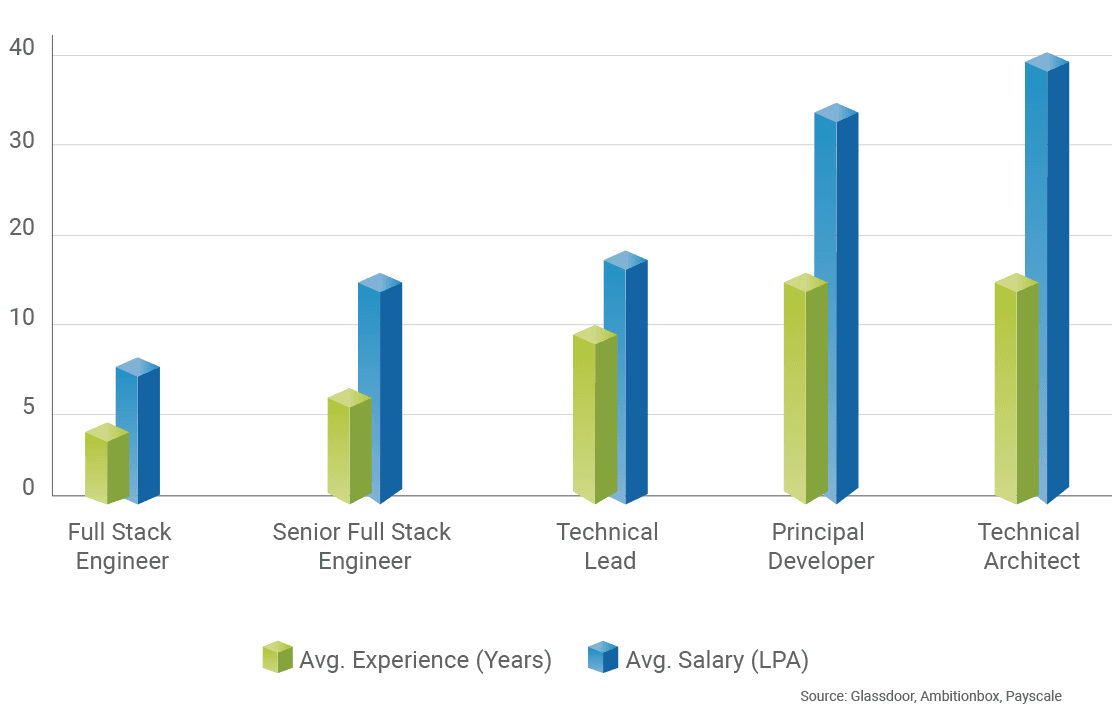
Career Progression and Salary Trends
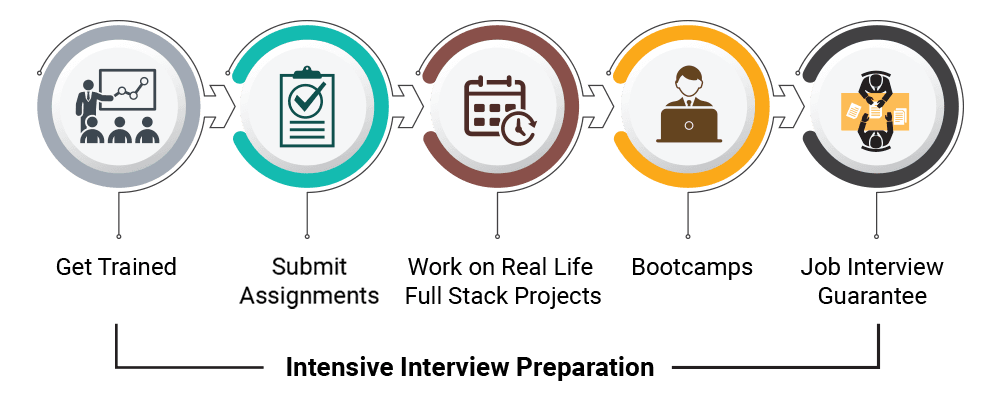
Learning Path
Why ExcelR

Industry-Based Course Curriculum

Seven Value Added Courses

Work Hands-on with 100+ Hours of Internship and 10+ Bootcamps

Guaranteed Job Interview Calls with our 2000+ partner companies

Support through WhatsApp, Calls, & Emails

Lifetime E-Learning Access
Course Curriculum
Introduction To Fullstack Technologies
- What is Fullstack
- What are the Requirements to build End to End Web Application?
- What are the Challenges in modern web development?
HTML - Front End
Introduction to Web
- Overview of Web And web application
- Overview of Mobile and mobile applications
- Web VS Mobile
- Web Designer vs HTML Developer
Core concepts of HTML
- Elements and Attributes
- Tags
- Introduction
- Types
- Single Tags / Empty Tags / Void Tag / Self Enclosing Tag
- Paired Tags
- Semantic Tags
- Non Semantic Tags
- Elements
- Introduction
- Types
- Inline elements
- Block Level
- Inline-Block
- Attributes
- Introduction
- Types
- Predefined Attributes
- Global Attributes
- Style
- Id
- Class
- Element Specific Attributes
- src
- alt
- type
- Custom / User Defined Attributes
Important Tags
- Text tags
- Headings
- to
- Paragraph
- Lists
- Ordered List
- Unordered List
- Definition ListTables
- article
- aside
- Graphic Tags
- Image Tag
- Figure tag
- Links
- Anchor
- Internal linking(Within Project)
- External Linking(from our project to external pages)
- (#)Hash Based navigation(With-in page)
- Multimedia Tags
- Audio
- Video
- Layout
- Div
- Section
- Header
- Main
- Nav
- Footer
Forms
- What is forms and why should we create a forms?
- Form tags and form attributes
- Form
- Form attributes
- Method
- Action
- enc-type
- Autocomplete
- Novalidate
- Form Elements & form element attributes
- Types
- Input types
- text
- password
- file
- hidden
- radio
- checkbox
- submit (Action Items)
- reset (Action Items)
- Textarea
- Dropdown Box
- select
- option
- Attributes of form elements
- type
- name
- placeholder
- value
HTML5
- HTML5 Features with Examples
- New structural elements
- New from control calendar, date,time,email,url,search
- Javascript enhancement
- New HTML5 APIs
- HTML Geolocation, HTML Drag And Drop, Web storage
- New function for embedding audio, video , graphics and svg
- Client-side data storage
- Interactive documents
- HTML5 validations Attributes
CSS- Front End
Introduction & Selectors
- What is CSS
- Why Use CSS?
- How is CSS Used?
- Creating and Linking a CSS StyleSheet
- How To Test A Stylesheet
- Selectors:
- What is a selector?
- The Universal /Global Selector
- The Tag /Element Selector
- The ID Selector
- The Class Selector
- The Attribute Selector
- The Relationship Selector
- Pseudo Selector
- Group Selector
- Specificity & When To Use Selectors
- What are Properties?
- The CSS General Rule
coloring & formatting, Fonts & text manipulation
- Types of Colors
- Coloring Text
- Background colors
- Images/URLs in CSS
- Other background Properties
- Opacity / Transparency
- Gradients
- Fonts & Text Manipulation:
- Introduction to types of units
- Text Manipulation
- Font Size,Bolding & Style
- Font Families
- Including external fonts W/Google Fonts
- Using External Fonts
Layout
- Introduction
- The Box Model
- Padding
- Border
- Margin
- Changing Content Size
- CSS Borders
- Margin & Padding
- Float & Display Types
Value Added Courses
Flexbox
- Introduction
- Flexbox Components
- Creating a Flex Container
- Flex Direction & Wrap
- Content Alignment
- Flex Item Order
- Shrink, Grow & Basis
- The 'Flex' Property
- Item Alignment
Grid
- Grid vs Flexbox
- Introduction
- Differences
- Creating a Grid
- Template Columns & Rows
- Justify & Align Grid
- Row & Column Gaps
- Column & Row Lines
- Grid Area
Animation & Transitions, Media Queries
- The Transitions Property
- Transform property
- Creating Animations w/Keyframes
- Adding an Animation
- Animation Properties
- Media Queries in css
- Introductions
- properties
Project 1 - Individual project on HTML & CSS
Bootstrap - Front End
Introduction to BootStrap
- What is Bootstrap
- History of Bootstrap
- Versions of Bootstrap
- Popularity of Bootstrap
- Bootstrap Documentation
- Installing Bootstrap Locally
- Install or adding Bootstrap via Cdn link
- Adding Javascript cdn link
Layout & Components
- BreakPoints
- Extra small
- Small
- Medium
- Large
- Extra large
- Extra extra large
- Containers
- container- fluid
- container
- Columns
- column
- row
- Gutter
- Horizontal gutter
- Vertical gutter
- Row column gutter
- No gutter
- Margins
- Padding
- Components in Bootstrap
Utilities
- Background
- Colors
- Display
- none
- inline
- inline-block
- block
- grid
- flex
- inline-flex
- Float
- float-start
- float-end
- Position
- position-static
- position-relative
- position-absolute
- position-fixed
- position-sticky
Flex
- Direction
- flex-column
- flex-column-reverse
- flex-row
- flex-row-reverse
- justify-content
- justify-content-start
- justify-content-end
- justify-content-center
- justify-content-between
- justify-content-around
- justify-content-evenly
- align-items
- align-items-start
- align-items-end
- align-items-center
- align-items-baseline
- align-items-stretch
- flex-fill
- flex grow & shrink
Grid
- Grid options
- Extra small (xs)
- Small (sm)
- Medium (md)
- Large (lg)
- Extra large (xl)
- Extra extra large (xxl)
- Containers and rows
- Columns
- Responsive Breakpoints
Presentation Session-1 / Practical Case Study Analysis by students
Project 2 - Individual Project on HTML, CSS & Bootstrap
Javascript- Front End
Introduction to Javascript
- What is Javascript? Use of javascript?
- Trend of Javascript?
- Types of Implementing Javascript?
- Inline
- Internal
- External
- What are the Datatypes? Example for each one of them?
- Variables & Constants?
- What is Hoisting?
- Alert, Prompt and Confirm Modals
Operators
- Operators
- What is Operators ?
- Types of Operators
- Examples for each one of them
- Decision Making
- What is decision making ?
- Different types?
- Examples for each one of them
- Loops
- What is loops?
- Usage?
- Types of loops?
- Entry controlled vs exit controlled loops
- Examples for each one of them
Data Storage Techniques & DOM Manipulation
- What are the types of data storage?
- Data Structures in JavaScript?
- Strings & Methods
- Mutable and Immutable Strings/Objects
- Arrays & Methods
- Objects & Methods
- Array of Objects?
- Object configuration and properties
- Writable and Enumerable Objects
- Object Clone
DOM & Dom Manipulations
- What is DOM & Dom Manipulation Methods?
- Types of DOM Manipulation Methods?
- Dom Selectors
- getelementById()
- getElementsByTagName()
- getElementsByClassName()
- querySelector()
- querySelectorAll()
- Adding Css using Javascript
- document.getElementById('idvalue').style.property = 'value';
- Classlist
- addClass
- removeClass
- InnerHTML
- Document.write() vs innerHTML
DOM
- Attaching Event
- addEventListener()
- Detaching Event
- removeEventListener()
- Manipulating Elements
- createElement()
- appendChild()
- removeChild()
- replaceChild()
- Adding Css using Javascript
- document.getElementById('idvalue').style.property = 'value';
- Classlist
- addClass
- removeClass
- InnerHTML
- Document.write() vs innerHTML
- Manipulating Attributes
- setAttribute()
- removeAttribute()
Functions
- What are Functions in JavaScript?
- When and where to use Functions?
- 6 Ways of declaring Functions
- Arrow Functions Advantages and Disadvantages
- Immediate Invoke Function
- Declare Function as Class/Expression
- setTimeout and setInterval
- Generator Functions
- Reusable Functions
- Function Advantages and Disadvantages
Forms & Events
- What is forms and validations?
- Events and Event handling
- Types of events
- Keyboard events
- keyup
- keydown
- keypress (deprecated)
- Mouse events
- click
- dblclick
- hover
- mouseover
- mousemove
- mouseleave
- contextmenu
- Form
- events
- submit
- blur
- focus
- reset
- change
- Page events
- load
- scroll
- resize
- What is event Bubbling And Capturing?
- Event loop
- Event Lifecycle
- Types of form validations
- field validations
- form validation
- Regular expressions
- form validation using regex
- form validation without regex
Error Handling
- What are the types of errors in JS?
- syntax errors
- type errors
- assignment errors
- reference errors
- others
- How to handle the errors?
- What is exception handling?
- try block
- catch block
- finally block
- throw block
- custom error messages
OOJS
- Object oriented Principles
- Data abstraction
- Data Encapsulation
- ES5
- Object Literal
- Object Constructor
- Es6+
- Classical
- Polymorphism
- Operators Overloading
- Function Overloading
- Inheritance
- Types of inheritance
- Is Supported Types
- Example
- Es5 - Prototypal Inheritance
- Es6+ - Classical Inheritance
- Getter and Setter
- Spread and Rest Operators
- Ajax Call in JavaScript
- Closures
- Race Condition
ES6 Concepts
- Strict Mode
- Module Export and import
- Block Scoping
- Template literals
JSON
- Call Backs, Async Await and Promises
- Call, Apply and Bind
Asynchronous JavaScript & Es6+ Features
- JSON Structure
- JSON Parse and Stringify
- ES5 vs ES6
HTML5 Features
- HTML5 Canvas
- HTML5 Web API's
- HTML5 Geo Tags, Drag and Drop
- Web Storage - Local vs Session
- Overview of PWA
- Web Service Workers
- Browser Tools - Chrome, Firefox and Edge
Presentation Session-2 / Practical Case Study Analysis by students
GIT
GIT
- Fast introduction to GIT commands,Simple Rebase Example,Setup for rebasing conflict,Abort a Rebase,Rebase Conflict Resolution,Pull with Rebase (GitHub)
Project 3 - Group Project using HTML ,CSS ,BOOTSTRAP,JAVASCRIPT
Core Java- Back End
Java Introduction
- Introduction To Java
- Java History
- Why Java
JVM, Class & Objects
- JVM
- Class, Objects, Data Types
- Variables
- Type Casting
OOPS
- Object Oriented Programming Concepts
- Abstraction
- Encapsulation
- Polymorphism
- Inheritance
- Java Coding Standards
Java Coding standards
- Package - Creating package, naming package
- Java Keywords
- Module resolution declaration merging
- Access Specifiers - Public, Private, Protected, Default
- Static Concept - Block, Variable, Method, Class
- Scanner Class
Control Statements
- Control Statement - If, If…else, Nested if…else and Switch Case
- Flow Statement- for, while, do..while
- Constructor- Default, Parameterized
- Inheritance
- Extends, super and this keyword
- Serialization
- Transient
- Exception Handling
- Exception Handling- try, catch, throw, throws, finally
Exception Handling
- Method Overloading, Method Overriding
- Interface
- Abstract Class
- Garbage Collection
- Marker Interface
String Concept
- String Concept
- String Basics
- String Methods
- String Buffer
- String Builder
Collection Framework
- Custom Immutable Class
- Framework
- Basics
- Iterator Interface
- Methods of Collection Interface
- List(Arraylist,Linkedlist and Vector)
Set & Map
- Set(Hash Set,Tree Set)
- Map(Hash Map, Tree Map, Hashtable)
- Collection Framework Advanced Concepts
- Comparable Interface
Comparator
- Comparator Interface
- Collections class
- Differentiate Comparable and Comparator
- Java Enum
- Date Concept
- File Handling Concept
- File Handling Basics
Folder & File
- Create Folder
- Create File- .txt. .pdf, .xlsx, .docs, etc
- Write File
- Read File
- Delete File
Thread
- Thread
- Concept,Lifecycle
- Extends Thread
- Implement Runnable Interface
- Thread Priorities
- Thread Methods
Thread Synchronization
- Thread Synchronization
- Synchronization
- Object Locking
- Inter Thread Communication
Practical Case Study Analysis by students
JDK
- JDK 1.8.0 New Features with Hands-on
- Lambda Expression
- Functional Interface
- Default Method in Interface
- Static Method in Interface
- Method References
- Date Time API
- Stream API
- Collectors
- For each Loop
- String Joiner Class
- Parallel Sort
- Optional Class
JDBC
- J2EE
- JDBC
- JDBC Introduction
- JDBC Architecture
- Database Overview
- JDBC Basics
- Mysql
- Create Database
- Create Table
Practical Case Study Analysis by students
Mysql
- Insert, Update, Delete
- Truncate
- SQL Join
- Inner Join
- Left Outer Join
- Right Outer Join
- Full Outer Join
- Aggregate Function
- MIN
- AVG
- SUM
- COUNT
- SQL HAVING Clause
- GROUP BY
- ORDER BY
- SQL Aliases
- SQL LIKE Operator
- SQL In
- SQL Between
- SQL Null Values
- SQL TOP
- SQL LIMIT
- SQL Stored Procedures
- Java Application Using JDBC Connectivity
- Handling SQL Exceptions
- DriverManager
- ResultSet
- Connection
- Statement
- Prepared Statement
- Callable Statement
- DB Connectivity Steps
- Store Image in SQL
- Read Image in SQL
- SQL Queries using SQLYog
Practical Case Study Analysis by students
JDBC
- JDBC CRUD Application
Servlet
- Servlet
- Servlet Basics
- Need of Server Side Programming
- Servlet Life
- Cycle 1 Init()
- Service()
- doGet()
- doPost()
- Destroy()
- Servlet Hello World Application
- Web.xml Structure
- Servlet Directives- include(), forward(), sendRedirictive()
- HttpServletRequest, HttpServletResponse in Servlet
- Servlet and JDBC Integration
- Servlet, HTML5, MySQL, Tomcat using Real Time Login Application
JSP
- JSP
- JSP Basics
- Creating dynamic Web content with JSP
- Scriptlet
- Declaration
- Servlet, JSP, MySQL, Tomcat Login Application
- Servlet, JSP, MySQL, Tomcat CRUD Application
Presentation Session-3 / Practical Case Study Analysis by students
Project 4 - Group Project using Frontend(HTML,CSS,JS,Bootstrap) and Backend(Core Java, Advanced Java, JDBC,SERVLETS and MYSQL)
Hibernate
- FRAMEWORK
- Hibernate
- Hibernate Introduction
- Hibernate Basics
- Hibernate Architecture
- Hibernate Session
- Hibernate SessionFactory
- Hibernate Configuration
- Hibernate Configuration Offline
- Hibernate with HBM
- Hibernate with Annotation
- Hibernate Validator
- Hibernate CRUD
- Hibernate Association Mapping
- One to One Mapping
- One to Many Mapping
- Many to One Mapping
- Many to Many Mapping
- Hibernate Aggregation
- Hibernate Named Queries
- Hibernate Native SQL
- HQL-Hibernate Query Language
- Hibernate HQL- Criteria Query Language
- Hibernate Application with Mysql DB-CRUD
- Diff. save(), saveOrUpdate(), update(), persist() and merge()
- Diff. get() and load()
- Hibernate vs. JPA
- Hibernate Application with Mysql DB, JSP-User Interface-CRUD
Spring Framework
- Spring Framework
- Singleton
- Prototype
- Request
- Session
- Global-Session
- Auto wiring
Spring MVC
- Spring Annotations
- Spring MVC
- Spring MVC Basics
- Spring MVC Hello World Application
- Spring MVC Restful Web Services Basics
- Spring MVC without Maven
- Spring MVC with Maven
- Maven basics
- Spring MVC Application Deployment
- Spring MVC Application Deployment Log files
- Spring MVC WAR File Creation Steps
- Spring, Hibernate, Mysql, Maven- CRUD Operation
- Java, Spring, Spring Security, Algorithm, Hibernate, Maven, Mysql Integration Application
Spring Security
- Spring Security
- Spring Security Basics
- Spring Security Features
- Spring Security Authentication
- Spring Security Encryption
- Password Encryption by using Spring Security
- Spring Security Login Form
- Spring Security Authentication
- Spring Security Maven Dependency
- Spring Security CRUD- Signup and Login Application
Spring Boot
- Spring Boot
- Spring Boot Introduction
- Spring Boot Basics
- Why Spring Boot
- Spring Boot Features
- Main Goal of Spring Boot
- Creating Project- Spring Initializer
- Spring Boot Hello World Application
- Spring Boot Devtool Dependency-Spring Boot - How to Reload Changes Without Restarting the Server
- Spring Boot Actuator
- Spring Boot Build Systems
- Spring Boot Code Structure
- Spring Boot Runners
- Spring Boot Tomcat Port Number
- Spring Boot with RESTFul Service
- Spring Boot with Logger
- Deploy Spring Boot Applications on External Tomcat Server
- Spring Boot - Common Application Properties (application.properties)
- Spring Boot, Hibernate with RESTFul Web Service
- Spring Boot, Spring Data with RESTFul Web Service
- Spring Boot, Hibernate CRUD Application
- Spring Boot, Spring Data JPA CRUD Application
- Spring Boot, Spring- JDBCTemplate CRUD
- Spring Boot, Hibernate, MySQL, Project Lombok CRUD Application
- Spring Boot with XML Payload using Postman API
- Spring Boot with JSON Payload using Postman API
- Spring Boot CORS Support
- Java QR Code Generator Basics
- Spring Boot QR Code Generator Hands on Session
- Spring Boot QR Code Reader Hands on Session
Practical Case Study Analysis by students
JPA
- Spring Data - JPA
- Spring Data JPA Basics
- Spring Data JPA Introduction
- Spring Data JPA Architecture
- Spring Data JPA application.properties file
- JPA Repository
- CRUD Repository
- Spring Boot, Spring Data JPA CRUD using Postman API
- Spring Boot, Spring Data JPA, Project Lombok CRUD using Postman API Hands on Session
Junit
- JUnit- Mockito Framework
JDBC
- Spring - JDBCTemplate
- Spring - JDBCTemplate Introduction
- RowMapper
- Builder
- Spring Boot, JDBCTemplate using Postman API Hands on Session
Web Services
- WEB SERVICES
- SOAP Web Service
- RESTful Web Service
Design Pattern
- Design Pattern
- Singleton Design Pattern
- Builder Design Pattern
- Factory Pattern
- Abstract Factory Pattern
- Prototype Pattern
- Facade Pattern
Adapter Pattern
- Adapter Pattern
- Filter Pattern
- Composite Pattern
- Decorator Pattern
- Proxy Pattern
- Iterator Pattern
- Bridge Pattern
- Flyweight Pattern
- MVC Pattern
Microservices
- MICROSERVICES
- Microservices Introduction
- Microservices Architecture
- Microservices Project Structure
- Microservices Frameworks
- Spring Boot with Microservices Basics
Spring Boot with Microservices
- Spring Boot with Microservices Coding Standards
- Spring Boot with Microservices Builder Design Pattern
- Spring Boot with Microservices QR Code Generator
- Spring Boot, Hibernate, Maven, MySQL CRUD Application- POSTMAN API
- Spring Boot, Spring Data-JPA, Maven, MySQL CRUD Application- POSTMAN API
- Spring Boot, Spring Data- JDBCTemplate, Maven, MySQL CRUD Application
- Spring Boot, ORM, Microservices with Project Lombok
- Spring Boot, CORS, Spring Data[JDBCTemplate], Microservices CRUD with Project Lombok Using React JS
Presentation Session-4 / Practical Case Study Analysis by students
React
React Introduction
- What is React?
- React Project Setup/React Boilerplate
- Variables and Datatypes
- Node, Module, Package, Node Package Manager(NPM)
- Create React App
React Basics
- Virtual DOM?
- Loops, Operator and Conditions?
- Array and String Methods
JSX
- What is JSX Element
- Commenting a JSX element
- Rendering a JSX Element
- Style and className in JSX
- Injecting data to a JSX Element
Components
- Big picture of components
- JavaScript function vs Class
- Creating React Component
- Class Component
- Functional Component
- How to create Reusable Components
Practical Case Study Analysis by students
Props
- Props in Functional Component
- What is props?
- Props object
- Destructuring props
- propTypes
- defaultProps
- How to share data between components using Props
State
- What is State in React
- How to set state in Functional Component
- How to set state in Class Component
- How to reset the State in class/functional
Navigation
- What is React Router ?
- BrowserRouter
- Route
- Switch
- NavLink
- Nested Routing
- Redirect
- Prompt
Forms
- Form input fields
- Form Data Binding
- Form Validations
- Styling Forms
Practical Case Study Analysis by students
Material UI
- UI Components
- Installing and integrate Material UI
- Theme, color, fonts and background
- UI Lists, Tables and accordion
API Request
- Async Request in React - Axios/Fetch
- How to do HTTP/API request?
- GET, POST, PUT and Delete using Axios and Fetch
LifeCycle Hooks
- Functional component Lifecycle hooks
- Class component Lifecycle hooks
- Refs and useContext
React Essentials
- ES6 vs ES5 React code
- React Events
- What are keys in React
- Higher order Components
- Style Properties in React Component
Practical Case Study Analysis by students
React Angular Frontend Advance
Ngrx/Redux Overview
- NgrX state management in Angular
- Redux and Flux in React
- ngRx vs Redux vs Flux
- Sample State implementation in Redux
Unit Testing
- Karma/Jasmine/Jest
- How to create sample test case
- How to write and execute unit test case
- How to ignore or run particular test case
Debug and Build
- Chrome Development Tools
- IDE - VsCode Debugging
- Console Log
- Debug Extensions for React
- How to build React Project
- What is Webpack and its alternatives?
- Build optimization techniques
Presentation Session-5 / Practical Case Study Analysis by students
Value Added Courses
UI/UX Fundamentals
- What is UX?
- The five main principles of UX design
- What do UX designers do?
- Benefits of UX design (and UX designers!)
- What's next? Key takeaways
CSS Preprocessor (Intermediate + Advanced)
- What is CSS?
- What problem does CSS solve?
- What are CSS preprocessors?
- CSS preprocessor features
- Pros and cons of using a CSS preprocessor
- Popular CSS preprocessors
- Final thoughts
Responsive Web Design Frameworks using Material UI
- Grid
- Container
- Breakpoints
- Use Media Query
API creation using ExpressJS and MongoDB
- What is MongoDB?
- Key Features of MongoDB
- What are Node and Express?
- What is REST API?
- Key Benefits of REST API
- Node Express MongoDB System Architecture
- Steps to Build a REST API using Node Express MongoDB
- Step 1: Connecting to MongoDB Atlas
- Step 2: Adding REST API CRUD Routes
- Step 3: Setting Up the Front-End
- Step 4: Testing the Application
- Conclusion
Maven/Ant
- Maven - Overview
- Maven - POM
- Maven - Build Lifecycle
- Maven - Creating Project
- Maven - Build & Test Project
- Maven - External Dependencies
- Maven - Build Automation
- Maven - Manage Dependencies
- Maven - Deployment Automation
- Maven - Web Application
- Maven - Eclipse IDE
DevSecOps Tools Overview
- Benefits of DevSecOps Tools:
- Types of DevSecOps Tools:
- DevSecOps Security Tools:
- DevSecOps Pipeline Tools:
- DevSecOps Automation Tools:
- DevSecOps Testing Tools:
- DevSecOps Monitoring Tools:
- DevSecOps CI/CD Tools:
- Other Vital DevSecOps Tools:
- Implement DevSecOps Techniques Using the Right Tools:
- Tips to Leverage Your DevSecOps Tools:
- Conclusion
Application Deployment on Cloud
- Write code and deploy automatically, AWS takes care of the infrastructure:
- Integrate with CD, build and deploy automatically. Never worry about configuration of the underlying services Use vanilla JavaScript, or any JS Go, Ruby, PHP, and Python An easy and quick way to deploy
- Build and deploy using containers:
- Build and deploy a website using cloud native technologies such as Docker and Kubernetes Fully managed infrastructure with lightweight and global scalability options available Easiest and fastest way to deploy a web application with containers
- Build and deploy on a virtual machine:
- Highest level of control of the complete technology stack Full support of the underlying operating system plus custom configurations Easiest conversion from on-premise virtual machines to cloud
ChatGPT
- Introduction to ChatGPT and AI
- AI and Machine Learning Concepts
- Chat GPT Functionalities and Applications
- Chat GPT Prompt Engineering
Python
- Variables,Data Types, Loops, Operators and Conditions
- Built In Functions and Lambda Functions
- List,Set and Tuples
- String and Dictionaries
- File Handling
- OOPS in Python
- Modules and Packages
- Generators and Iterators
- Decorators
- Context Managers
- Virtual Environments
Contact Our Team of Experts
Why ExcelR?
FAQs
What Is Instructor-Led Online Training?
- Instructor-led online training is an interactive mode of training where participants and trainer will log in at the same time and live sessions will be done virtually. These sessions will provide scope for active interaction between you and the trainer.
How Many Batches Can I Attend, If Enrolled For Training?
- ExcelR offers a blended model of learning. In this model, you can attend classroom, instructor-led live online and e-learning (recorded sessions) with a single enrolment. A combination of these 3 will produce a synergistic impact on the learning. You can attend multiple Instructor-led live online sessions for one year from different trainers at no additional cost with the all new and exclusive JUMBO PASS.
Is This A Live Training Or Recorded Sessions?
- It is a live instructor-led interactive session which is done at a specific time where participants and trainer will log in at the same time. The same session will be also recorded and access will be provided to revise, recap or watch any missed session.
What If I Miss A Live Session?
- Not a problem even if you miss a live Full Stack Development session for some reason. Every session will be recorded and access will be given to all the videos on ExcelR’s state-of-the-art Learning Management System (LMS). You can watch the recorded Full Stack Development sessions at your own pace and convenience.
Will I Get A Full Stack Development Course Completion Certification From ExcelR?
- Yes, after successfully completing the course you will be awarded a course completion certificate from ExcelR.
Whom Should I Contact If I Want More Information About The Training?
- You can reach out to us by visiting our website and interact with our live chat support team. Our customer service representatives will assist you with all your queries. You can also send us an email at enquiry@excelr.com with your query. Our Subject Matter Experts / Sales Team will clarify your queries or call us on 1800-212-2121 (Toll-Free number – India), +1(281) 971-3065(USA), 800 800 9706 (India), 203-514-6638 (United Kingdom), 128-520-3240 (Australia).
What Are The Different Modes Of Payment Available?
- The different payment methods accepted by us are
- Cash
- Net Banking
- Cheque
- Debit Card
- Credit Card
- PayPal
- Visa
- Mastercard
- American Express
- Discover
Global Presence
ExcelR is a training and consulting firm with its global headquarters in Houston, Texas, USA. Alongside to catering to the tailored needs of students, professionals, corporates and educational institutions across multiple locations, ExcelR opened its offices in multiple strategic locations such as Australia, Malaysia for the ASEAN market, Canada, UK, Romania taking into account the Eastern Europe and South Africa. In addition to these offices, ExcelR believes in building and nurturing future entrepreneurs through its Franchise verticals and hence has awarded in excess of 30 franchises across the globe. This ensures that our quality education and related services reach out to all corners of the world. Furthermore, this resonates with our global strategy of catering to the needs of bridging the gap between the industry and academia globally.