DevOps Certification Course Training in Niagara Falls, Canada
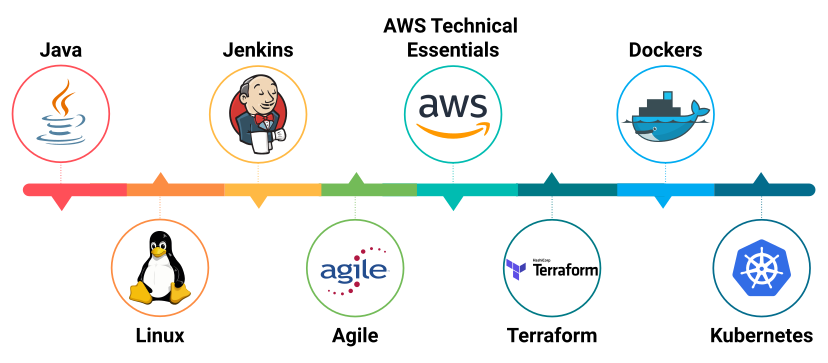
7 in 1 Combo Program With Value Add Live Courses :
- Dockers and Kubernetes
- AWS Technical Essentials
- Terraform
- Jenkins and JUnit
- Agile
- Java Fundamentals
- Linux Fundamentals




Program Highlights
Skills Covered
Tools and Technologies

Eclipse IDE

Git and GitHub

Amazon EC2

Putty and Puttygen
Maven

Jenkins

JUnit

BlazeMeter
Containers and Dockers
Kubernetes

Terraform

Prometheus and Grafana

ELK Stack

Overview of DevOps

Ansible

Atlassian

JFrog

MSBuild

NEXUS

Puppet

Sonarqube
TeamCity

XL Deploy
Why ExcelR


Projects
Project 1: DevOps Code Pipeline
- DevOps Code Pipeline is a fully managed continuous delivery service that helps you automate your release pipelines for fast and reliable application and infrastructure updates. Every time the code changes, code pipelines automate the build, test, and deploy phases of the release process based on the release model you define. It enables you to rapidly and reliably deliver features and updates. You can easily integrate DevOps Code Pipeline with third-party services such as GitHub or your custom plugin. With DevOps Code Pipeline, you only pay for what you use. There are no upfront fees or long-term commitments.
Project 2: Project-Deploying PHP Guestbook Application with Redis (kubeadm)
- Build and deploy a simple, multi-tier web application using kubeadm Cluster and Docker which must consist of the below components.
- A single-instance Redis to store guestbook entries
- Multiple web frontend instances
Road Map of DevOps Course:

Course Curriculum
Module 1 - DevOps Essentials
- Why DevOps?
- What is DevOps?
- Agile and DevOps
- DevOps Lifecycle
- DevOps Market Trends
- DevOps Delivery Pipeline
- DevOps Ecosystem & Use Case
- Introduction to Virtualization
- Introduction to Cloud Computing
Module 2 - Managing Source Code – Git and GitHub
- Overview of Version Control systems
- Central vs Distributed Control systems
- Introduction to Git
- Git file workflow
- Important Git Commands
- Branching and Merging, Stashing, Rebasing, Reverting and Resetting
- Introduction to GitHub
- Using Git and GitHub together.
Module 3 - Understanding and using Build tools
- Overview of Various Build tools
- What is Maven
- Maven Plugins
- Maven Archetypes
- Project Object Model (POM)
- Source Control Integration
Module 4 - Containerization basics using Docker
- What and Why of Containers
- Difference between VMs and Containers
- Docker Architecture and Components
- Image Distribution using Docker Hub
- Working with Containers and Docker Hub
Module 5 - Continuous Integration and Delivery using Jenkins
- Overview of Continuous Integration
- Overview of Jenkins
- Jenkins architecture
- Installing and Configuring Jenkins
- Jenkins Management
- Jenkins Build Pipeline
Module 6 - Continuous Testing
- Overview of Continuous Testing
- Software Testing Life cycle
- Different Types of Testing
- Test -Driven Development Approach using Junit
- Testing Web Applications using Selenium
- Working with Apache JMeter and BlazeMeter for Performance Testing
Module 7 - Docker Commands and Use-cases
- Docker Files
- Docker Compose
- Docker Networking
- Docker Swarm
Module 8 - Introduction to Kubernetes
- Basics of Kubernetes container orchestration
- Differences between Docker Swarm and Kubernetes
- Kubernetes Architecture
- Installing Kubernetes using Kubeadm
- Creating Pods and Deployments using YAML
- Selectors & Labels in Kubernetes
- Using ReplicaSets & Rolling Updates
- Scheduling the applications on the container
- Services in Kubernetes
Module 9 - Configuration Management using Ansible
- Overview of Configuration Management
- Introduction to Ansible
- Ansible Architecture
- Ansible Components
- Installation & Configuration
- Writing Ansible Playbooks
- Working with Ansible variables
- Working with Ansible Modules
- Creating Roles using Ansible Galaxy
Module 10- Continous Deployment using Terraform
- Infrastructure as Code using Terraform
- Terraform vs other tools (Chef & Puppet)
- Overview of HashiCorp Configuration Language
- Installation of Terraform in Linux
- Terraform commands and usage
- Providers in Terraform
- Understanding Terraform variables
- Using provisioners in Terraform
- State Management in Terraform
- Understanding Terraform State
- Configuring a Remote State
- Understanding resources needed in VPC creation
- Configuring EC2 Instances
- Working with Terraform Modules
Module 11- Continuous Monitoring using Promethus,Grafana and ELK
- Overview of Logging and Monitoring
- Exploring Logs-Kubernetes
- Monitoring using Prometheus and Grafana
- Working with ELK
Module 12- AWS DevOps Services
- Why Cloud?
- Overview of AWS
- Overview of AWS DevOps
- Working with Cloudformation
- Introduction to CodeCommit, CodeBuild, CodeDeploy and CodePipeline
Value Added Courses
Module 13 - Agile
- Introduction to Agile
- Project Definition
- Difference Between Traditional & Agile Project Mgmt.
- Agile Manifesto and Principles
- Agile Methodology
- Agile Principles
- Agile Frameworks and Terminology
- Agile Methodologies
- Scrum
- XP
- Agile Analysis and Design
- Product Roadmap
- Product Backlog
- Story Maps
- Agile Modeling
- Wireframes
- Charting
- Personas
- Planning and Monitoring
- Iteration and Release Planning
- Progressive Elaboration
- Time Boxing
- Cumulative Flow Diagram
- Kanban Boards
- WIP Limits
- Burn Charts
- Retrospectives
- Innovation Games
- Agile Metrics and Estimations
- Relative Sizing
- Story Points
- Wideband Delphi Technique
- Planning Poker
- Affinity Diagram
- Ideal time
- Velocity
- Cycle Time
- EVM
- Escaped Defects
- Quality
- Frequent Verification and Validation
- Test Driven Development
- Definition of Done
- Continues Integration
- Feedback Techniques
- Incremental Delivery
- Continuous Improvement
- Value Based Prioritization
- Customer Valued Prioritization
- Compliance
- Relative Prioritization
- Value Stream Mapping
- Minimum Marketable Feature
- Risk Management
- Risk Adjusted backlog
- Risk Burn down charts
- Risk based spike
- Agile Communications
- Team Space
- Information Radiator
- Agile Tooling
- Daily Stand-ups
- Osmotic Communication
Module 14 - AWS Technical Essentials
- Cloud Basics and Introduction to AWS
- Overview of Cloud Computing
- Introduction to Cloud Terminologies
- Primary Benefits of Cloud/AWS
- AWS Global Infrastructure
- Getting Started with AWS
- Overview of AWS
- Access and Tour the AWS Console
- AWS Free Tier
- AWS Networking
- Networking Basics in AWS
- Understanding CIDR and Subnets
- Understanding VPC
- AWS Compute
- Compute Basics
- Overview of AWS Compute Services
- Understanding EC2 Instances
- Working with AMIs
- ELB and Scaling EC2
- What is Elastic Load Balancing (ELB)?
- Types of ELB
- Overview of Auto Scaling
- Autoscaling Components
- What is AWS Global Accelarator?
- Identity and Access Management (IAM)
- Understanding IAM
- Managing Users, Groups, and Roles
- AWS Storage
- Overview of AWS Storage Services
- Working with EBS
- S3 Properties
- S3 Storage Classes
- Working with Storage Gateway
- Overview of AWS Glacier
- Database Service
- Differences between SQL and NoSQL
- Working Relational Database Service (RDS)
- Monitoring, Logging, and Notifications
- Monitoring and Logging Basics
- Working with CloudWatch (Monitoring, Metrics, and Logs)
- Working with CloudTrail
Module 15 - Java Overview
- Introduction to Java
- Installing the tools (JDK,JRE, IntelliJ)
- Java Basics
- Java Operators
- Control Flow in Java
- Classes,
- Objects and methods
Module 16 - LINUX Fundamentals
This interactive LINUX training course ensures that users become competent at interacting with LINUX and are able to navigate the ever-developing OS. Our engaging trainers will help you learn the following modules:
- What is LINUX?
- Why choose LINUX?
- Navigating LINUX?
- The LINUX? Kernal
- Versions and distributions
- Installing LINUX?
- Slackware
- LINUX? Exploration and User Interaction
- Using the Command-Line Interface
- Common commands
- Managing files and directories
- Using the Graphical Interface
- Configuring the system
- Networking with LINUX?
- Using security features
- Switching User Contexts
- Graphical Desktop
- Editing Text
- LINUX? Files
- LINUX? FileSystem Features
- Navigating the FileSystem
- LINUX? Disk Usage
- Basic LINUX? Troubleshooting
- Changing File Permissions
- Directory Manipulation
- Archiving
Self Paced Modules
- Atlassian
- MAVEN
- SONARQUBE
- XLDEPLOY
- TEAMCITY
- JFROG
- MS BUILD
- NEXUS
- NPM
- ELK
Contact Our Team of Experts
Why ExcelR?
FAQs
What Is Instructor-Led Online Training?
- Instructor-led online training is an interactive mode of training where participants and trainer will log in at the same time and live sessions will be done virtually. These sessions will provide scope for active interaction between you and the trainer.
How Many Batches Can I Attend, If Enrolled For Training?
- ExcelR offers a blended model of learning. In this model, you can attend classroom, instructor-led live online and e-learning (recorded sessions) with a single enrolment. A combination of these 3 will produce a synergistic impact on the learning. You can attend multiple Instructor-led live online sessions for one year from different trainers at no additional cost with the all new and exclusive JUMBO PASS.
Is This A Live Training Or Recorded Sessions?
- It is a live instructor-led interactive session which is done at a specific time where participants and trainer will log in at the same time. The same session will be also recorded and access will be provided to revise, recap or watch any missed session.
What If I Miss A Live Session?
- Not a problem even if you miss a live DevOps session for some reason. Every session will be recorded and access will be given to all the videos on ExcelR’s state-of-the-art Learning Management System (LMS). You can watch the recorded DevOps sessions at your own pace and convenience.
Will I Get A DevOps Course Completion Certification From ExcelR?
- Yes, after successfully completing the course you will be awarded a course completion certificate from ExcelR.
Whom Should I Contact If I Want More Information About The Training?
- You can reach out to us by visiting our website and interact with our live chat support team. Our customer service representatives will assist you with all your queries. You can also send us an email at enquiry@excelr.com with your query. Our Subject Matter Experts / Sales Team will clarify your queries or call us on 1800-212-2121 (Toll-Free number – India), +1(281) 971-3065(USA), 800 800 9706 (India), 203-514-6638 (United Kingdom), 128-520-3240 (Australia).
What Are The Different Modes Of Payment Available?
- The different payment methods accepted by us are
- Cash
- Net Banking
- Cheque
- Debit Card
- Credit Card
- PayPal
- Visa
- Mastercard
- American Express
- Discover
Global Presence
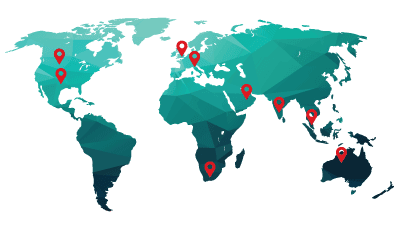
ExcelR is a training and consulting firm with its global headquarters in Houston, Texas, USA. Alongside to catering to the tailored needs of students, professionals, corporates and educational institutions across multiple locations, ExcelR opened its offices in multiple strategic locations such as Australia, Malaysia for the ASEAN market, Canada, UK, Romania taking into account the Eastern Europe and South Africa. In addition to these offices, ExcelR believes in building and nurturing future entrepreneurs through its Franchise verticals and hence has awarded in excess of 30 franchises across the globe. This ensures that our quality education and related services reach out to all corners of the world. Furthermore, this resonates with our global strategy of catering to the needs of bridging the gap between the industry and academia globally.